VIBE system configuration form
Overview
The VIBE configuration form allows you to customize your VIBE desktop instance, including resource allocation and session duration.
The form fields are dynamically generated. The available options depend on the type of resources associated with the account you select. This means that not all resources are available for all account types. For non-VIBE users, the UBELIX cost and billing scheme applies, including free tiers. Note that free tiers are intended for testing purposes only and come with limited resources and support.
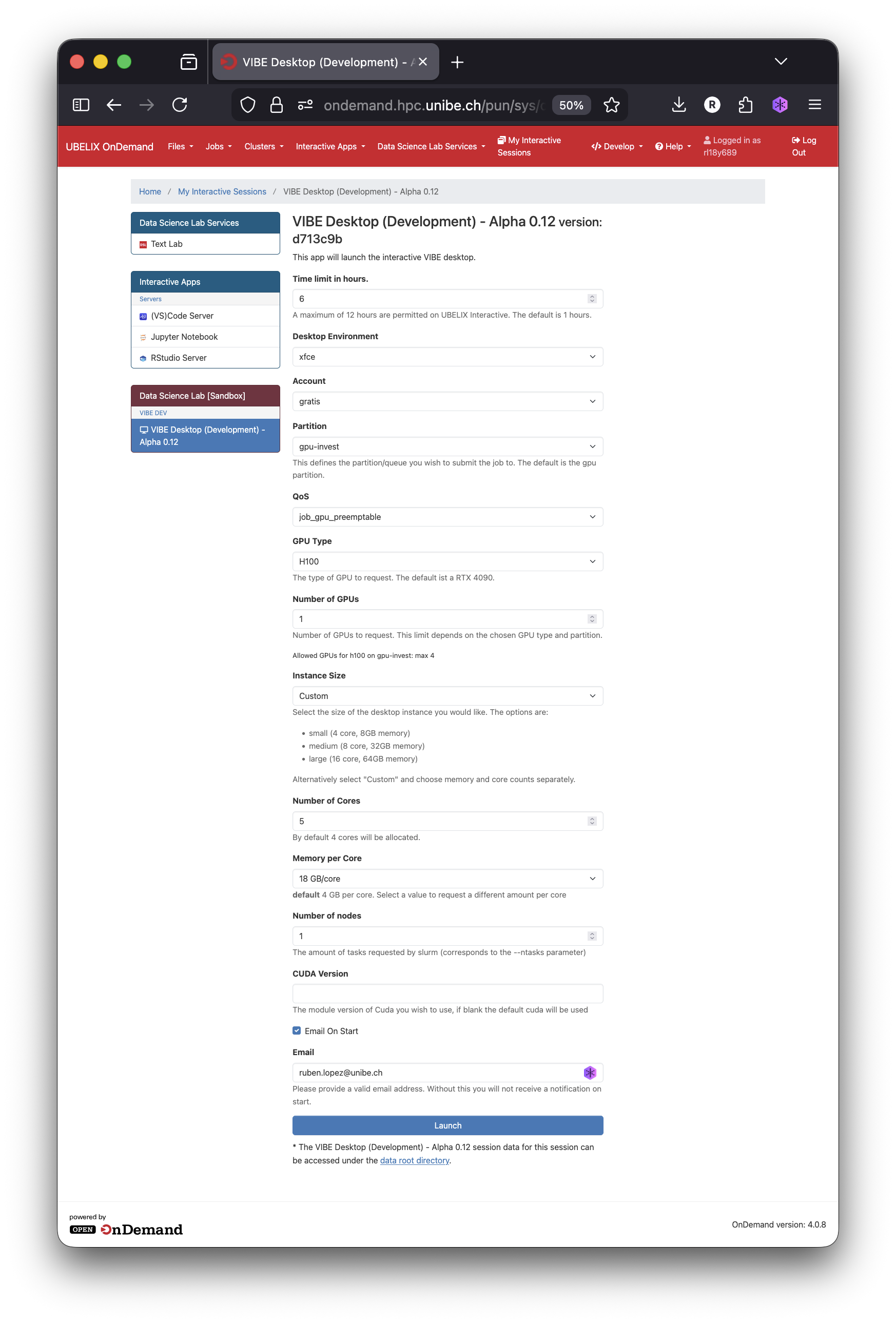
Here is an explanation of each field you can adjust according to your needs:
Account
Choose the appropriate account type based on your use case:
| Account | Description |
|---|---|
| gratis | Select this option for testing purposes with limited resources |
| invest | Select this option if you are a VIBE user |
| paygo | Select this option if you own a wc key of an independent project. You must use your project wc_key1 |
| teaching | Choose this option if you intend to use VIBE desktop for workshops or other teaching activities |
wckey
Enter your wc_key here to launch the VIBE desktop on a Pay-Go basis using your project’s allocated resources. You must have an UBELIX project wc_key to use this option.
QoS
Depending on the account type you selected, different Quality of Service (QoS) options are available. Your QoS options are displayed automatically once you have picked an account. The VIBE QoS job_gpu_vibe is assigned automatically when you select the invest account. The VIBE desktop can run on other QoS, but is currently supported on GPU partitions only. You must select an account and QoS that targets GPU nodes.
VIBE subscribers have the highest QoS when requesting resources for the virtual desktop. This means VIBE users benefit from the highest priority for allocating dedicated VIBE hardware and the shortest waiting time to start their session. Note that VIBE hardware may be used by another QoS, such as the preemptable queue. If this is the case, a brief idle period (a few minutes) is needed to reclaim those resources for your session.
Additional details on QoS and their usage can be found in the UBELIX documentation on QoS.
GPU type
Select from the available GPUs. VIBE’s dedicated graphics cards are the RTX 4090 and RTX 6000 MIG 24G. Use either of these if you are on the VIBE QoS. Other cards may be used if you run the VIBE desktop on a different QoS.
Instance Size
Define the amount of resources (CPU cores and RAM) for your session. Three default configurations are available:
| Instance size | Number of cores | RAM size (GB) | note |
|---|---|---|---|
| Small | 4 | 16 | Good for small tasks such as browsing your files and opening small images |
| Medium | 8 | 32 | For more demanding tasks that involve computations on your images, etc |
| Large | 16 | 64 | For visualizing in 2D or 3D modest datasets and some modest computations |
| Custom | - | - | Select this if you want to use a different configuration. |
Number of GPUs
Select the number of GPUs you plan to use. By default, one GPU is assigned to your session. If you are unsure how many GPUs to use or how large your instance should be, use this guide to determine your resource needs.
Number of hours
Choose the time allocated for your VIBE session.
Session Configuration
By changing the “Standard” session configuration, you can customize your session — for example, by adding environment variables or loading custom modules. This option is recommended for advanced users only.
Warning
Changing the session configuration may break your session in unexpected ways. Only use this option if you know what you are doing. Get in touch with the VIBE support team for guidance on how to customize your session this way.
Email on start
If your session is queued for some time, you can provide a valid email address to receive a notification once your session begins.
Instance limits
The maximum instance size for VIBE users depends on the GPU you select. The table below displays the configuration limits for VIBE dedicated hardware:
| GPU type | Number of cores | RAM size (GB) per graphic card | number of GPUs | Time in hours |
|---|---|---|---|---|
| RTX 4090 | 16 | 90 | 4 | 24 |
| RTX 6000 MIG 24G | 8 | 90 | 4 | 24 |
-
Using the preemptable queue: 1 hour per session, max 4 GPUs. Any GPU listed on UBELIX, subject to availability. Standard UBELIX RAM and CPU limits apply.
-
Using your own wckey: 1 hour per session, max 4 GPUs. GPUs are limited to those accessible from your wckey project. Standard UBELIX RAM and CPU limits apply.
Note on storage options
VIBE offers by default the same storage capacity offered by UBELIX. Read more on the storage quota and the different storage options from the UBELIX documentation.
-
For more details, refer to the Pay-as-you-go (PAYGO) Scheme from UBELIX. ↩